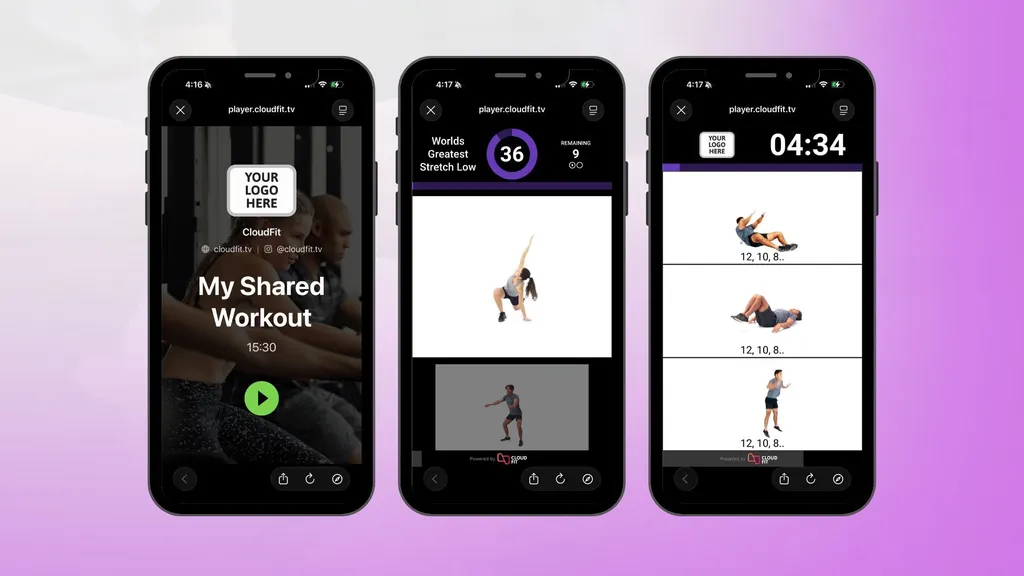
With Published Workouts, CloudFit customers can publish selected workouts and share them directly with members using a simple link. Members can open and follow the workout on their phone, tablet, or computer without installing anything.
Whether you want to support at-home training, travel workouts, open gym sessions, or workout previews, Published Workouts gives you a simple way to make workouts available to members outside the gym.
What are Published Workouts?
Published Workouts is a CloudFit feature that lets you make selected workouts available to members outside the gym.
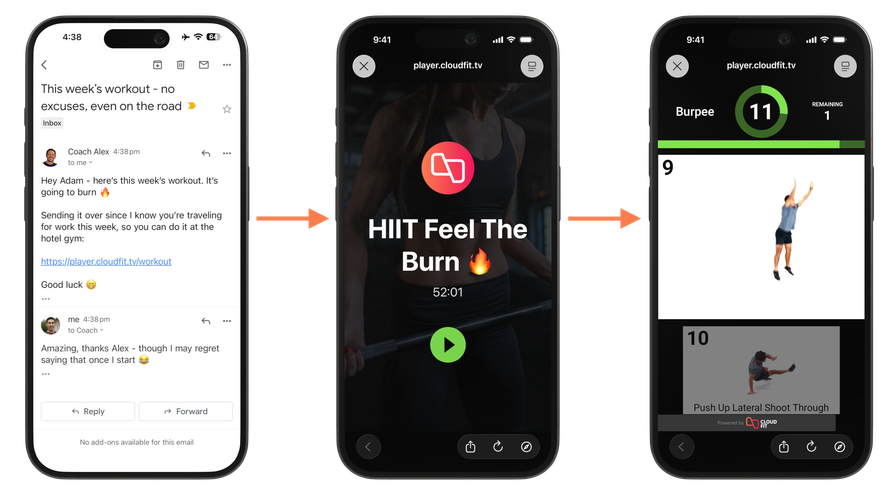
Once published, a workout can be shared anywhere you already communicate with members, including email, chat, messaging, your website, or your own mobile app. Members can then open the workout on their own device and follow it without needing to install anything.
Instead of sending a screenshot, PDF, or manually typed workout, you can share a cleaner and easier experience that is ready to use.
Why we built this feature
Many gyms and studios want to support members beyond scheduled classes and beyond the physical gym itself.
Your members may want to train at home, stay on track while traveling, follow a workout during open gym, or preview what is coming up before they arrive. Until now, sharing workouts in those situations has often meant extra admin, duplicated work, or a poor member experience.
Published Workouts solves that problem by giving you a simple way to create or adapt workouts in CloudFit for member access, then share them wherever your members already engage with your business.
How Published Workouts works
Using Published Workouts is simple:
- Build your workout in CloudFit.
- Publish the workout you want to make available.
- Share the link by email, message, chat, your website, or your own app.
- Members open and follow the workout on their phone, tablet, or computer.
It is a straightforward way to extend your programming without adding friction for staff or members.
Common ways to use Published Workouts
Published Workouts is flexible enough to support a range of use cases for gyms and studios.
At-home training
Give members access to workouts they can follow from home when they cannot make it into the gym.
Travel workouts
Help members stay consistent when they are away for work, on holiday, or training somewhere else.
Open gym sessions
Make workouts available for members to follow on their own device during open gym hours.
Workout previews
Let members preview an upcoming workout before class starts.
Embedded workouts
Add workout links to your own website or member app so your programming can be accessed as part of your broader digital experience.
Why it is useful for gyms and studios
Published Workouts gives gyms and studios a better way to deliver workouts outside the gym.
Some businesses may choose to publish versions of workouts they already run in CloudFit, while others may create workouts specifically for members to follow on their own device. Either way, Published Workouts makes it easier to share programming for at-home training, travel, open gym sessions, and workout previews.
It also reduces manual work. Instead of relying on screenshots, PDFs, or copied text, your team can publish workouts directly from CloudFit and share them in a format that is simpler for members to access and follow.
For fitness businesses with their own website or mobile app, Published Workouts also creates more ways to make workouts available through the channels you already control.
Choosing the right workouts to publish
Not every workout that works well on screens inside the gym will be the best fit as a Published Workout.
Some workout formats are designed for a group training environment, where members can glance up at a shared display and get the context they need. For example, a workout with a grid of exercises or multiple videos on screen can work well in class, but may be less suitable for a single person following along on their own device.
In many cases, simpler workout formats work better for Published Workouts, especially when the experience is designed for one person training at home, while traveling, or during open gym.
The best approach is to think about the member’s context. If they are following the workout alone on a phone, tablet, or computer, choose a workout style that is clear and easy to follow in that setting.
A better alternative to screenshots and PDFs
Many fitness businesses already share workouts with members in some form, but the process is often clunky. Screenshots, notes, PDFs, and copied text can work, but they are not ideal.
Published Workouts gives you a better option. Members get a cleaner experience, and your team gets a simpler workflow using workouts created or adapted in CloudFit for member access.
That means less duplication, less friction, and more opportunities to keep members engaged outside the gym.
Who is Published Workouts for?
Published Workouts is a strong fit for gyms and studios that want to extend their programming beyond the gym floor.
It is especially useful for businesses that offer open gym, support members training at home or while traveling, want to preview workouts before class, or want to surface workouts inside their own app or website.
If you are already creating workouts in CloudFit and want members to access them outside the gym, Published Workouts is built for exactly that.
Available on CloudFit Free and Business
Published Workouts is available to try on the CloudFit Free plan and included with unlimited use on the CloudFit Business plan.
This makes it easy to try the feature and start exploring how Published Workouts can work for your business. For gyms and studios that want to use Published Workouts more extensively, the Business plan includes unlimited Published Workouts along with other advanced features for growing fitness businesses.
Start sharing workouts with members
Published Workouts makes it easier to share your programming beyond the gym in a way that is simple for your team and easy for members to access.
To get started, update your CloudFit app to the latest version and review our help center guide for setup instructions and best practices.