Choosing workout display software for your gym comes down to a few practical questions: what it costs, what hardware it runs on, how quickly coaches can build a class and whether you can see it working before you commit. This guide compares CloudFit, Funxtion FXGYM, Gymlete and FitViz Pro on those points. If you're new to the category, start with what a workout display system is and how workout display systems work.
Disclosure: We make CloudFit. This is our assessment of our own product and competitors' public information, last reviewed on October 5, 2026, not a hands-on test of every platform.
- Which should you choose?
- Compare the platforms
- Why choose CloudFit?
- CloudFit vs Funxtion FXGYM
- CloudFit vs Gymlete
- CloudFit vs FitViz Pro
Which workout display software should you choose?
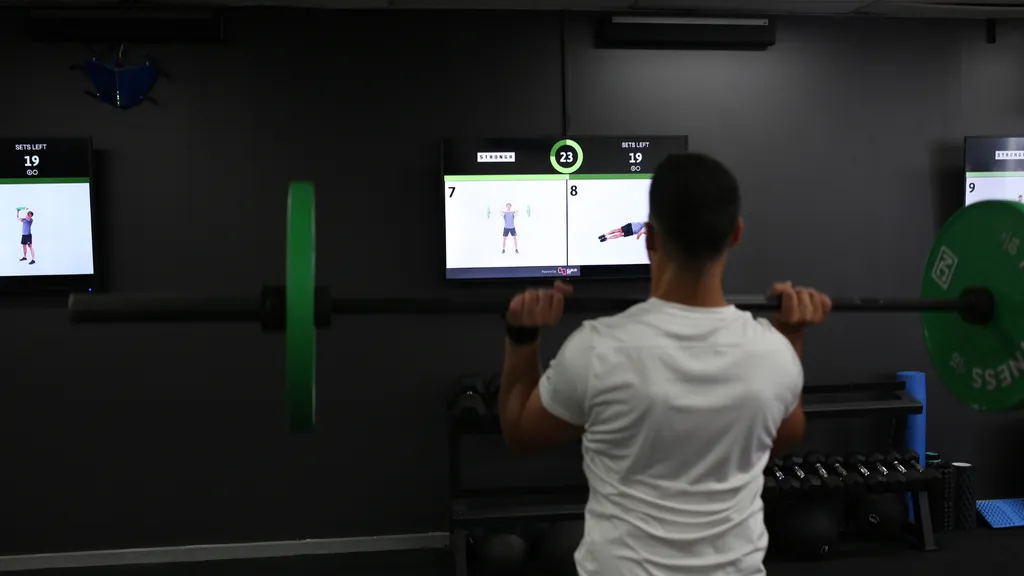
CloudFit is our recommendation for gyms that want to deliver better classes with their own programming. Build sessions in an easy-to-use app, turn your gym TVs into a gym workout display with exercise videos and timers, and give coaches more time to coach. You get published pricing, a Free plan with no time limit, a 30-day Business trial and a team you can contact for help.
Here's how the alternatives differ:
- Funxtion FXGYM is an established option used by operators including Fitness First, sold through a bespoke quote with vendor-supplied hardware.
- Gymlete leads with gaming and immersive fitness. We didn't find published pricing or a free trial.
- FitViz Pro publishes pricing and offers a free plan, but we couldn't confirm most of its workout features from public material.
How do these workout display platforms compare?
The table summarizes public information reviewed on October 5, 2026. Here's what each symbol means:
- ✓ Yes: shown in the vendor's public material, such as its website, pricing page, help docs or app store listings.
- ○ Limited: available with restrictions, or only partly shown.
- ✕ No public evidence found: we didn't find it in the vendor's public material.
- ? Unconfirmed: not clearly stated, or described but not shown working.
| Comparison criterion | CloudFit | Funxtion FXGYM | Gymlete | FitViz Pro |
|---|---|---|---|---|
| Published pricing | Yes | No public evidence found | No public evidence found | Yes |
| Free version | Yes | No public evidence found | No public evidence found | Yes |
| Free trial | Yes | No public evidence found | No public evidence found | Yes |
| Verifiable customer testimonials/ | Yes | Yes | No public evidence found | No public evidence found |
| Evidence behind customer claims | Yes | Yes | Limited | No public evidence found |
| Regular feature announcements | Yes | Yes | No public evidence found | No public evidence found |
| Buy your own supported players | Yes | No public evidence found | Yes | Unconfirmed |
| Multi-screen workouts | Yes | Yes | Limited | Unconfirmed |
| Built-in exercise video library | Yes | Yes | Yes | Unconfirmed |
| Custom exercise video uploads | Yes | Yes | Limited | Unconfirmed |
| Dedicated whiteboard editor | Yes | No public evidence found | No public evidence found | Unconfirmed |
| Brand customization | Yes | Yes | Yes | Unconfirmed |
| Workout scheduler | Yes | Yes | Unconfirmed | Unconfirmed |
| AI exercise selection | Yes | Unconfirmed | No public evidence found | Unconfirmed |
Want to see CloudFit on your own screens? Start free with no time limit, or try every Business feature free for 30 days.
Why choose CloudFit?
Everything you need to run great classes, in one app
CloudFit is built for one job: helping you run your own programming on the gym floor. Build a workout in minutes on your phone, tablet or computer, set work/rest intervals, add coaching notes and send it to every screen in the room. Choose from more than 4,000 exercise demonstration videos, or film your own on your phone so members see the exact equipment and variations used in your gym.
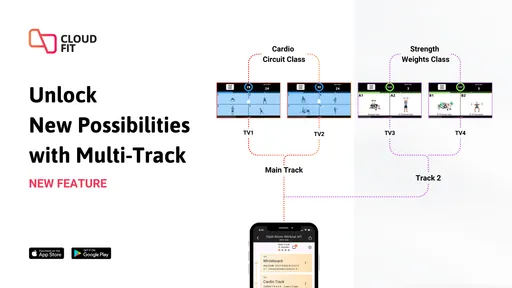
Schedule workouts to start automatically, so the class is ready before members walk in. CloudFit AI helps you build and refine programming in seconds, our free workout series give you hundreds of ready-to-run sessions, and Published Workouts lets members follow selected sessions at home or on the road. With CloudFit Business, add your branding, give coaches and staff their own access, and run multiple displays, including separate workout tracks for different areas of the room. Our feature guide shows how it all works, and the plan comparison explains what each plan includes.
The result is a class members can follow and coaches can focus on. New arrivals glance up at a demonstration instead of waiting for one. Timers and transitions run themselves. A cover coach delivers exactly the session the head coach wrote. See how CloudFit helps with consistent class delivery and programming across multiple locations.
Always improving, shaped by your feedback
We're always listening to the gym owners and coaches who use CloudFit, and that feedback drives how the product improves. When something could work better, we fix it. When a gym asks for a new way to program or present a class, it often becomes our next feature. That's why new features land all the time. Recent releases include:
- Published Workouts, so members can follow your sessions outside the gym.
- More than 300 free, ready-to-run workouts across the Original, Signature and Pilates series, alongside our free HYROX-style workouts.
- Image support for custom exercises.
- Account sharing for trainers, coaches and staff.
- The Whiteboard Canvas Editor, with precise control over text, fonts, colors and media.
Every release is documented in our product updates, so you can see exactly how CloudFit is evolving before you commit. Got an idea or hit a snag? Tell us and it goes straight to the people building the product.
Responsive support from a team you can reach
Our team can help you choose hardware, build workouts and get your screens working together. Email support@cloudfit.tv when you need help, or book a conversation with us to work through your room and programming. You can ask questions during your trial as well as after you subscribe.
Trusted by gyms every day
Gym owners and coaches tell us, on camera and in their own words, what CloudFit has changed for them:
"CloudFit has completely changed the game for us. Before, we wrote out all our workouts on whiteboards, but now we've streamlined our programming across all our locations. Our members instantly know what they're doing, and our coaches can simply focus on coaching." — Jon Lazo, Eze Fit
"CloudFit allows trainers to focus on correcting form and motivating members without the need to keep explaining how the class works and where to move. It's easy for the trainers to deliver and the members to follow." — Jamie Needham, Hustle Street
- Video testimonials from gym owners and coaches, including Darcy Ellis (Hitfit), Jon Lazo (Eze Fit) and Jamie Needham (Hustle Street), discussing programming, coaching and custom exercise videos.
- Gym case studies, including how:
- Darcy Ellis scales Hitfit's programming across locations
- Jon Lazo grew Eze Fit from a single studio into a franchise
- Terrick Smith puts T50 Fitness's own coaches and workouts on screen
- Kaisa Kerwin runs The Fit Shop's rolling 15-minute classes in Miami
- Adam Becker built GluteHouse Miami around what women want from a gym
- Customer videos and gym-floor examples on CloudFit's Instagram.
Each story names the gym and the people behind it, so you can see CloudFit working in real classes before you try it yourself.
Transparent pricing, no lock-in contracts
CloudFit's prices and plan inclusions are published for every region, so you know what it costs before you speak to anyone. There are no lock-in contracts and you can cancel whenever you like. We only want you using CloudFit if it's adding value to your gym.
Start on the Free plan, which has no time limit and runs unlimited workouts on one display, and move to Business when you need more. You also choose from supported hardware, including Apple TV, Google TV and Amino devices, with iPad support too, so you can price both software and players before rolling out to more screens.
Not every provider makes this easy. Funxtion asks you to request a quote, and we didn't find published pricing for Gymlete, so you'll need a sales conversation before you can compare costs.
CloudFit vs Funxtion FXGYM: which is easier to buy and set up?
CloudFit is easier to buy and set up. Funxtion sells FXGYM through a bespoke quote with vendor-supplied, preconfigured hardware, while CloudFit publishes its prices and lets you choose your own supported players.
Funxtion is a fitness software company for gym operators. FXGYM is its product for gym-floor screens, sold alongside a management platform, a member app and an exercise content library.
FXGYM looks like a polished, credible option for in-gym workout delivery. Its product page shows installations at operators including Fitness First, DiR and SportCity, alongside synchronized screens and custom programming. Fitness First's parent company also documents Funxtion-supported group workouts, confirming its use in their gyms.
Funxtion also publishes dated feature announcements for its wider platform, including releases in February, May and August 2026. These cover the management platform rather than a separate FXGYM-only changelog.
We didn't find a publicly offered free plan, free trial or digital whiteboard editor in the FXGYM material reviewed.
Funxtion advertises AI exercise suggestions through its wider platform; confirm what is included with an FXGYM package. If you want to compare prices and get started without a sales process, we'd start with CloudFit.
CloudFit vs Gymlete: which is built for running your own classes?
CloudFit is built around running your own classes. Gymlete is built around gaming and immersive fitness, with workout instruction as one of its wider tools. It describes itself as a leader in immersive technology for wellness, offering a software and gaming platform for fitness operators.
Gymlete names SPENGA and ReFuel Bootcamp in its testimonials, but we didn't find links from those endorsements to the customers' websites or social profiles. Its US Studio App Store listing had 3.9 out of 5 from seven ratings on October 5, 2026. That small sample gives buyers little information about reliability.
The listing describes iPad playback with an external screen, externally hosted custom videos and text blocks. Confirm whether those tools cover the multi-screen layouts, uploads and whiteboard editing you need. We found App Store release notes, but no regular feature-announcement series, publicly offered free service plan or trial, or AI exercise selection. The app is free to download; service terms need checking.
Ask for a current gym reference and a workout-building demonstration. CloudFit's customer videos and case studies show those everyday workflows before you start a trial.
CloudFit vs FitViz Pro: can you see the features working?
Mostly no, based on public material. FitViz advertises many features, but we found no screenshots, demos, help center or tested-device list showing them working.
FitViz Pro, branded Fit Viz on its website, is a workout display platform that also advertises class scheduling and booking tools. It publishes its pricing, including a Free plan and a 14-day trial of its paid plan, which is why the table marks pricing, a free version and a trial as available.
Its feature page and workout-display page describe exercise uploads, branding, whiteboards and workout scheduling, mostly in text, without screenshots or demo videos of the tools used to build those workouts. We also didn't find a help center, user guide or tutorials explaining how they work.
Hardware details are vague too. The homepage says FitViz works on any modern TV, tablet, monitor or projector with a browser, but we didn't find a list of tested devices or a setup guide.
Its FAQ also notes that advanced multi-display operation needs special hardware, without saying what. Between the missing feature demos and the vague hardware details, the table marks most of FitViz's features as unconfirmed.
The customer evidence is thin too. The workout-display page includes three named testimonials, but they don't link to the customers' websites or social profiles. The homepage displayed 4.6/5 from 671 first-party ratings on October 5, 2026, but we couldn't inspect the underlying reviews or how they were collected. Its Google Play listing showed 50+ downloads on October 5, 2026, a small Android footprint rather than a count of all users or gyms.
We'd be cautious about choosing software to run daily classes on that basis. Before committing, ask for a live demonstration of each feature you need, documentation your coaches can use, and references from gyms you can contact. CloudFit gives you named customer interviews, a public record of product updates and a free way to test every feature yourself.
Start with CloudFit
Get started with CloudFit with one display on the Free plan, then move to Business when you need more screens, staff access or your own branding. If you're moving from an older platform, our Aktiv TV, MZ-Instruct and PEAR replacement guide covers the changeover. For heart-rate displays, virtual classes and other categories, see our gym screen technology comparison.