You can get professional-quality photography for your gym without spending a dollar. Royalty-free stock libraries like Pexels, Unsplash, and Pixabay host millions of images shot by professional photographers and made free for any commercial use. Pair that with a few simple smartphone-photography habits — and, in 2026, AI image tools where they fit — and even a one-coach studio can build a visual brand that looks every bit as polished as a chain gym's. This guide walks through where to source images, what to avoid, and how to use them across your CloudFit displays, social channels, and website.
Quick checklist for great gym visuals
- Free stock libraries: Pexels, Unsplash, Pixabay (commercial use, no attribution required)
- Smartphone shots: natural light, simple backgrounds, horizontal 16:9 framing
- Resolution: 1920×1080 minimum for digital signage; 2400px+ wide for hero images
- Brand consistency: pick a colour palette and stick to it across every image you use
- Avoid: stock images that obviously look like stock images (overlit gyms, fake-smile models)
- AI images: great for abstract or branded backgrounds; risky for "real customer" content
- Permissions: never use Google Image Search results — they are rarely licence-free
Why does great photography matter for a gym?
Members judge a gym in the first three seconds of looking at it — on Instagram, on your website, on a screen as they walk in. Pixelated photos, cluttered shots, or images that obviously do not match your brand all chip away at the perception that you run a serious operation. Strong visuals do the opposite: they make a small studio look established and a busy gym look organised.
The good news is that you do not need a big budget for any of this. Most gym owners, trainers, and managers we work with are great at the gym side of the business and not necessarily at photography — but the tools available in 2026 mean you no longer have to be. Free libraries, capable smartphones, and AI image generation between them cover almost everything you need for marketing, digital signage and whiteboard backgrounds, and social posts.
What are the best free stock photo sites for a fitness business?
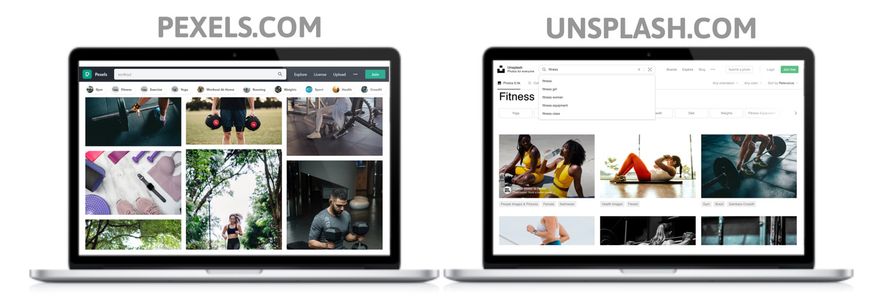
Three sites cover almost every gym marketing scenario:
- Pexels — massive library, strong fitness category, all images free for commercial use with no attribution required.
- Unsplash — known for its photography quality and consistent visual style. Good for hero images and lifestyle shots.
- Pixabay — broader content (including illustrations and vectors), useful when you need a graphic element rather than a photo.
A few smaller libraries worth keeping in your bookmarks for variety: Burst (Shopify's free stock library, good for product-style shots), Gratisography (more characterful, less generic), and StockSnap (rotates fresh images frequently).
Two practical tips when searching these libraries:
- Search for what you actually want, then narrow. "Gym" returns generic dumbbell shots; "kettlebell swing", "rowing machine", or "group fitness class" returns far more usable results.
- Pick a visual style and stick to it. If your first image is moody and dark, do not pair it with a bright, sun-drenched second image two slides later. Consistency beats variety.
A note on licensing: every image on Pexels, Unsplash, and Pixabay is free for commercial use without attribution. That is not true everywhere on the web — never grab images from Google Image Search results or social media, where most photos are copyrighted. If a site does not explicitly say "free for commercial use," assume it is not.
Can you use AI-generated images for your gym?
Yes, with some judgement. Tools like Adobe Firefly, Midjourney, ChatGPT image generation, and Google's Imagen can produce high-quality images on demand from a text prompt. They are particularly good for:
- Abstract or textured backgrounds for digital whiteboards and screen displays
- Branded graphics where a stylised look is fine (motivational quote backgrounds, social posts)
- Concept images for marketing campaigns where a real photo would be expensive to stage
Where AI images still struggle is anything that needs to look like a real customer at your real gym. Anatomical details, equipment specifics, and authentic facial expressions can land in the uncanny valley, and members usually spot it. For "this is what training at our gym actually looks like" content, stick to real photos.
A few practical guardrails: check your AI tool's licensing terms (Adobe Firefly is trained on licensed stock and is generally safe for commercial use; some other models have murkier provenance), avoid generating images of identifiable real people, and disclose AI-generated imagery if your local advertising standards require it.
How do you take good photos with a smartphone for your gym?
Most modern smartphones shoot at a quality that would have required a $2,000 camera ten years ago. The difference between a smartphone photo that looks amateur and one that looks professional is rarely the camera — it is light, framing, and timing.
Quick rules that lift smartphone gym photography immediately:
- Use natural light when you can. A large window beats overhead fluorescents nine times out of ten. Shoot in the morning or late afternoon for warmer, more flattering light.
- Get closer than you think you should. Wide gym-floor shots almost always include clutter that pulls the eye away from the action.
- Shoot horizontal. 16:9 fits screens, websites, and most ad placements; vertical works for Instagram Stories and Reels but is awkward everywhere else.
- Lock focus and exposure. Tap and hold on your phone screen to lock both before you shoot — it stops the camera "hunting" mid-shot.
- Burst mode for movement. Hold the shutter to capture 10–20 frames; pick the best one.
- Edit before publishing. A free tool like Snapseed or Lightroom Mobile takes 30 seconds to lift exposure, balance colour, and crop tightly.
The same equipment, lighting, and background tips that apply to filming exercise demonstrations apply here — for the full breakdown of how to set up a clean shot in a gym, see how to film pro-quality exercise videos for your gym.
Where should you use photography in your CloudFit setup?
Once you have a library of strong images, the next question is where to put them. CloudFit gives you several places where great photography materially lifts the in-gym experience:
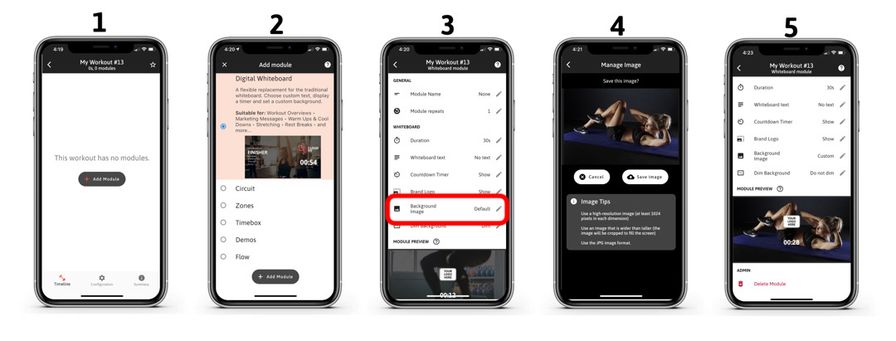
- Custom background images for your TV displays — turn the screens into branded surfaces between classes.
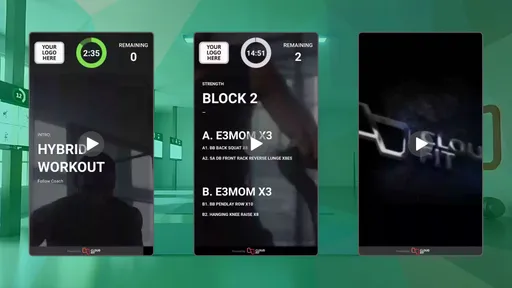
- Digital Whiteboard Modules — full-screen images and videos behind your workout text, so even a simple AMRAP looks polished.
- The Media Library — upload an image once and reuse it across every whiteboard module, screen, and location.
- Class promo and notification screens — drive attention to challenges, events, and member milestones with strong supporting imagery.
The same images then translate into your social posts, your website, your in-app member communications, and your marketing collateral — so a single afternoon spent building an image library compounds across every channel.
When should you hire a professional photographer?
Free libraries and smartphone photography handle most use cases. You should still hire a photographer when:
- You are launching a new studio and need a hero set for your website and Google Business Profile
- You want photos of your actual coaches, equipment, and members (stock images cannot do this)
- You are running a paid ad campaign where image quality directly affects conversion
- You are pitching to a brand partner, landlord, or franchisor and need polish
A fitness-specialist photographer in most major cities runs $800–$2,500 for a half-day shoot covering a couple of class formats and 3–5 coaches. Look for a portfolio that shows movement and bodies under gym lighting — not just lifestyle headshots — and ask for the full resolution rights so you can crop and reuse the images however you need.
If you are not sure whether you have outgrown the free approach yet, talk to our team and we can give you a read based on what other studios at your stage are doing.
What makes a gym photo work well on screen?
For images you plan to display on TVs and digital signage, three things matter more than they do for general marketing photos:
- Resolution. Anything you put on a 4K screen needs to be at least 1920×1080, ideally 2400px wide. A pixelated background image is the single fastest way to make a polished workout display look amateur.
- Focal point on the rule-of-thirds, not the centre. Whiteboard text and timer overlays usually sit in the centre of the screen — keep your subject off-centre so the overlay does not cover the action.
- Sufficient contrast. White text on a busy bright photo is unreadable from across a gym floor. Either choose images with darker upper or lower thirds where text will sit, or apply a subtle dark gradient overlay before uploading.
These rules also apply to images you reuse on Instagram, where text overlays are common, and on website hero sections.
Frequently asked questions
Are Pexels and Unsplash images really free for commercial use? Yes. Both Pexels and Unsplash explicitly licence their images for free commercial use, with no attribution required. You can use them on your website, in paid ads, on your gym screens, and in printed materials. Their licence pages spell out the small handful of exceptions (mainly: do not resell the images themselves and do not use them to suggest a person endorses your business).
Can I use Google Image Search results for my gym website? No. Google Image Search returns images from across the web, almost all of which are copyrighted. Using them without permission is a copyright violation and can result in takedown notices or licensing fees. Stick to dedicated free-stock libraries or images you have shot yourself.
What resolution do I need for gym digital displays? At least 1920×1080 (full HD) for any image you put on a TV. For 4K screens or hero website images, aim for 2400px wide or larger. Free stock libraries like Unsplash and Pexels almost always offer images at these resolutions or higher.
Are AI-generated images safe to use for gym marketing? Generally yes for abstract, stylised, or branded content, particularly from tools with clear commercial-use licensing like Adobe Firefly. Be cautious about images that depict identifiable people or imply real customer testimonials, and check the licensing terms of whichever tool you use.
How can I use photography in CloudFit? You can upload custom images as TV display backgrounds, as full-screen backgrounds for Whiteboard Modules, and via the new Media Library to make a single image reusable across every whiteboard and location. The CloudFit mobile app handles uploads directly from your camera roll.
You do not need a marketing budget or a photography background to make your gym look professional in 2026. A few minutes on Pexels or Unsplash, a handful of smartphone shots taken with the rules above, and a thoughtful eye for where to place them gets you most of the way. If you would like a hand bringing it all together inside CloudFit, start your free trial or get in touch with our team — we work with thousands of studios and are happy to share what is working.